You run ghx pr list
The ghx client resolves your repo, branch, and auth context, then forwards the request to the ghxd daemon over a Unix socket.
A caching proxy for the GitHub CLI that makes repeated commands instant. Singleflight coalescing means 10 agents asking the same thing triggers just 1 API call.
Cached responses return in ~0.1s instead of ~1s. Your scripts and agents feel instant.
Five agents requesting the same PR list simultaneously? Only one API call is made. All five get the result.
Only known-safe read-only commands are cached. Mutations pass through directly and invalidate related cache entries.
Just use ghx instead of gh. The daemon auto-starts. No configuration needed.
Real-time web dashboard shows hit rates, per-command stats, and a live request log. Helps you tune your TTL.
Context-aware cache keys prevent cross-repo collisions. Unix socket with strict permissions. No tokens stored.
ghx pr listThe ghx client resolves your repo, branch, and auth context, then forwards the request to the ghxd daemon over a Unix socket.
Using a context-aware key (repo + branch + host + auth + args), it looks for a valid cached response. If found and within TTL, it returns instantly.
On a miss, the daemon executes gh once. If other clients request the same thing concurrently (singleflight), they all wait for and share the single result.
The stdout, stderr, and exit code are cached with a configurable TTL (default 30s). The client writes stdout/stderr and exits with the original exit code.
Measured with gh pr list --repo cli/cli --limit 2 --json number,title
Monitor cache performance at http://localhost:9847/
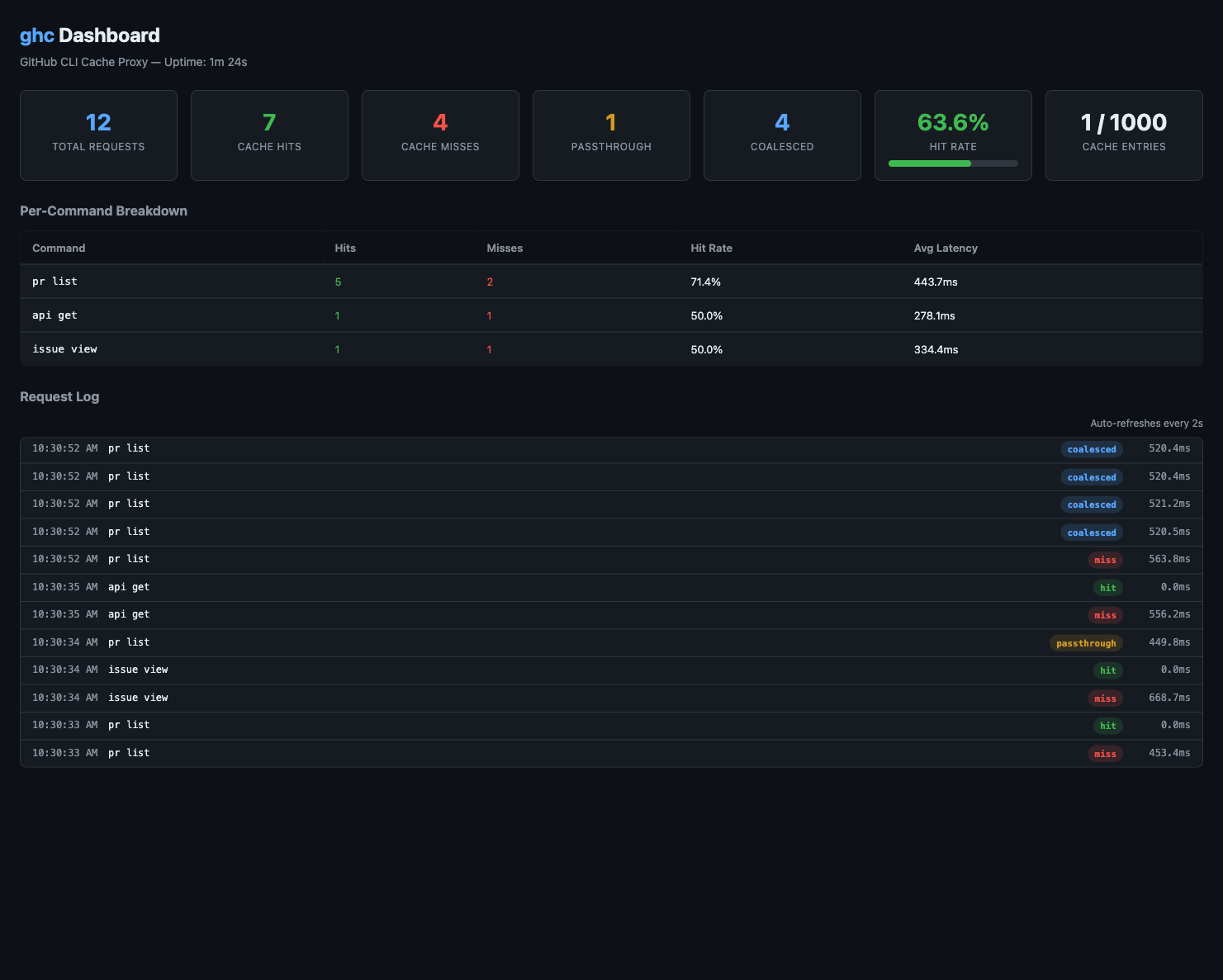
The dashboard data is also available as JSON for scripting and automation:
curl http://localhost:9847/api/stats | jq .curl http://localhost:9847/api/log?limit=50 | jq .curl http://localhost:9847/api/ttl-analysis | jq .
Only explicitly allowlisted read-only commands are cached. Everything else passes through.
| Command | Cached | Notes |
|---|---|---|
gh pr list/view/status/checks/diff | ✓ Cached | With any filter/format flags |
gh issue list/view/status | ✓ Cached | Including --json, --comments |
gh repo view/list | ✓ Cached | |
gh run list/view | ✓ Cached | |
gh workflow list/view | ✓ Cached | |
gh release list/view | ✓ Cached | |
gh search repos/issues/prs/commits/code | ✓ Cached | |
gh api (GET) | ✓ Cached | REST GET only |
gh label list | ✓ Cached | |
gh gist list/view | ✓ Cached | |
gh project list/view | ✓ Cached | |
gh cache list | ✓ Cached | Actions cache |
gh ruleset list/view/check | ✓ Cached | |
gh org list | ✓ Cached | |
gh pr create/merge/close | ✗ Mutation | Invalidates PR cache |
gh issue create/edit/delete | ✗ Mutation | Invalidates issue cache |
gh auth/config/codespace | ✗ Passthrough | Always direct to gh |
Add commands to the allowlist without recompiling. Edit ~/.ghx/config.yaml
and list subcommand prefixes under additional_cacheable.
Any gh invocation whose arguments start with a listed prefix will be cached.
Restart the daemon after making changes.
ttl: 60s

additional_cacheable:
  # Cache `gh status` output
  - "status"
  # Cache Actions variable listings
  - "variable list"
  # Cache team member queries
  - "api graphql"
# Install with Homebrew (macOS)brew install brunoborges/tap/ghx# Or one-liner (macOS / Linux)curl -fsSL https://raw.githubusercontent.com/brunoborges/ghx/main/install.sh | bash# Windows (PowerShell)irm https://raw.githubusercontent.com/brunoborges/ghx/main/install.ps1 | iex# From Sourcegit clone https://github.com/brunoborges/ghx.gitcd ghx && make build
Pre-built binaries are available for macOS (Apple Silicon), Linux (x64 & arm64), and Windows (x64 & arm64). Browse releases →
gh Shim for Transparent Caching
When you install ghx, a lightweight gh shim is automatically placed on your PATH
if no existing GitHub CLI is detected. This is especially powerful for AI coding agents —
they call gh by default, and the shim ensures every command is routed through the ghx caching layer
before hitting the real GitHub CLI. No agent configuration needed.
gh shim is created automaticallyDuring installation (Homebrew, install script, or PowerShell), ghx checks if a real gh binary exists on your system. If not, it installs a tiny shim at gh that routes all commands through ghx.
gh — caching happens automaticallyAI agents like GitHub Copilot and Claude Code use gh for GitHub API calls. With the shim in place, every gh pr list, gh issue view, or gh api call flows through ghx's cache — eliminating redundant API requests and preventing rate limits, with zero changes to the agent.
If ghx needs the real GitHub CLI to execute a command, it automatically downloads and installs gh for you. No manual setup required — just run your commands and ghx takes care of the rest.
When a real gh binary is detected, ghx will not install the shim — so agents will keep calling gh directly, bypassing the cache. You have two options:
Remove the GitHub CLI and reinstall ghx. The shim will be created, and agents automatically get caching via gh. ghx will download the real gh binary on first use.
Keep the GitHub CLI and install the agent plugin instead. The plugin teaches agents to call ghx directly instead of gh.
For Claude Code and
GitHub Copilot CLI —
install the plugin and your agent automatically prefers ghx over gh.
/plugin marketplace add brunoborges/agent-plugins
/plugin install ghx@agent-plugins
ghxA built-in skill teaches the agent to prefer ghx for all GitHub CLI commands. Binaries are lazy-installed on first use — no manual setup needed.
ghx is designed to be safe by default — no secrets stored, no network exposure.
The Unix domain socket uses 0600 permissions. Only your user can communicate with the daemon.
Auth tokens are never written to disk or cache. Only a SHA-256 fingerprint is used in cache keys to prevent cross-account collisions.
The web dashboard binds to 127.0.0.1 only — it is not accessible from the network.
All cached data lives in memory and is lost on daemon restart. Nothing is persisted to disk.
Each user runs their own isolated daemon instance. No shared state between users on the same machine.